
Ever have “automation FOMO”?
You know the feeling. Ideas for automating your sales ops pile up faster than you can execute them. Leads need routing, data needs cleaning, follow-ups…so many follow-up ideas. Yet not all of it goes smoothly. And every time you try to fix one thing, you end up papering over it with yet another Zap.
That’s not a knock on Zapier. We love Zaps. But as workflows grow more complex and you (hopefully) scale into higher volumes, your costs climb, too.
You don’t want that eating into sales rep time: according to Gartner, 77% of sellers already struggle to complete their assigned tasks.
Enter n8n. It’s more than a simple no-code automation shortcut; it's a full platform for teams that don’t want automation to fall apart as their sales grow. Built right, using n8n will feel less like a chain of triggers and more like a robust system with decision-making logic. Let’s explain.
TL;DR
- n8n is a fair-code platform for self-hosted, secure workflow automation
- Self-hosting cuts costs by eliminating Zapier’s “per-task” pricing models
- Handle complex logic with branching, loops, and advanced error handling capabilities
- Build "upsert" workflows to prevent duplicate records and maintain CRM hygiene
- Integrate Close via webhooks to trigger real-time enrichment and routing actions
What is n8n?
n8n is a workflow automation platform for connecting apps and databases with an intuitive visual interface.
What sets n8n apart from other automation tools is that you can self-host it, either on-premises or via cloud services.
Typically, an automation platform wants per-task or per-action pricing. n8n’s pricing is tiered by the number of “shared projects” you can use within your team, without worrying so much about how many “actions” you use.
Don’t get us wrong: n8n is still here to handle the basics of automation. Once installed, it will “listen” for trigger events and pass the data between your tools, as Zapier might.
What’s different here is how much control you get to exercise.
The standard n8n workflow works on a system of “nodes,” which is kind of a fancy word for building blocks. You can use these nodes for automation: branching connections, looping, handling retries, etc.
Translation: it’s more flexible. Like plumbing, where you get to control where the pipes go.
(Which is nice when you’re working in a real sales environment, and not the easy setup of a software demo.)
Your automation becomes more robust this way. Since your automation platform can run more actions, it can also perform more checks. For example, it might…
- …check where a lead should go
- …enrich the lead with any data you want to pull
- …update the CRM
- …handle edge cases without creating duplicates
And because you’re not paying per-action, you don’t mind the pricing. It’s kind of nice: more sales without more automation headaches.
Warning: n8n Probably Isn’t for You If…
If we make n8n sound like the greatest thing since sliced bread, that’s our fault. It’s a unique solution, and like all unique solutions, it only fits some use cases.
n8n probably isn’t for you if…
- …you don’t have anyone comfortable reading logic flows…or basic JavaScript, really
- …you want zero infrastructure responsibility (and prefer to call customer support)
- …automation failures go to vendor support, not your team, which can complicate your schedules
- …your lead volume is low and unlikely to grow, making per-action pricing more tenable
Which isn’t to say you’re a simpleton if you want a different option. But you may want to reconsider n8n if you do want to keep your automation simpler before exercising more control.
More control typically means more responsibility, too. Maybe you’d prefer to outsource things to Zapier-like tools before you’re ready.
Why Sales Teams are Switching to n8n
Your sales team may have experimented with automation before. You may be running it now. But the second it stops feeling like a fun, “lightweight” way to get things done…
…well, that’s when you start browsing for different tools.
The more your sales expand, the more complicated automation gets. Teams might add a Zap to route leads. Then another to enrich the lead data. But when there’s another to update the CRM, it becomes too much to manage. (And, if you’re paying per-action pricing, it’s too much to spend.)
n8n appeals to teams who want their automation to feel smarter. Automation that can reason, even debug. n8n lets you edit your automation without feeling like you’re rewiring the whole system from scratch every time a trigger breaks.
With n8n, you own the workflow, the logistics, even the whole infrastructure.
Maybe that’s not important if your sales are static. But in a growing sales team looking to scale, you may find that your lead routing pipelines need to get more specific. And CRM hygiene becomes less “automatic” and more something you have to defend over time…using a more advanced automation infrastructure.
Escaping the "Task Tax"
The task tax is what happens when you get a little too okay with automation that charges per action. You may not mind it when automations are small and infrequent. But in sales, every little thing (lead enrichment, CRM updates) adds up. Especially when you scale.
Let’s look at an example. If an automation platform charges you per task, it might limit you to, say, 30,000 tasks per month before you have to upgrade to the higher tier.
But now imagine your automation’s getting a little unhygienic on the back end. Each lead triggers:
- 5 enrichment steps
- 4 CRM updates
- 1 routing decision (being generous)
That’s already ten tasks per lead. At 30,000 tasks per month, your upper limit is 3,000 inbound leads, not 30,000.
Plus, any added automation logic increases those numbers. Onto the next pricing tier, which means more “per-user-per-month.” Now prices are increasing, too.
With n8n, the costs are flatter:
- Server hosting
- Upfront costs of time spent building/maintaining the workflow
- A “shared project” with multiple users
At the $20/month pricing tier, you have as many automation actions as you like. You only start running into new pricing tiers when you have new projects or need to run more actions at the same time—i.e., as you get busier.
The key point: you can run as many steps as you want within a single workflow. Maybe a new lead triggers 10 actions. Or 20. Or 30. It really doesn’t matter; you can get as sophisticated as you want without increasing costs exponentially.
Handling Complexity and Errors
Sales data in the real world is messy.
Leads often come in incomplete. Your system might duplicate them or format them incorrectly.
No-code automation tools don’t do well with this, either. They tend to assume everything’s going just peachy; they don’t give you options for cleaning up data. Instead, it’s on you to feed cleaner data.
n8n is under no such delusions. It acknowledges that you may need cleaner data and that it’s to be expected that your automation pipelines don’t always work. It can handle multiple records and automated retries within a single workflow, without firing separate automations when an error occurs.
n8N therefore makes it easier to configure solutions, including:
- Retrying failed steps in your pipeline for tweaking
- Create new “branch logic” based on conditions you specify
- Route errors to somewhere more useful, like customer support
- Capture more of your data rather than simply dropping it into CRM “ghost zones”
n8n’s conditional logic means it’s built to exist in a world of imperfect data. This gives you more options for catching and fixing it.
3 Example n8n Workflows For Sales
Okay, enough theorizing. What does n8n look like in practice? Let’s take it one example at a time:
Example #1: Lead intake with smart routing
Scenario: A new lead visits your website via a web form or similar inbound tool. They fill in their info, and they’re interested in buying. (Good job with the ol’ inbound marketing, by the way.)
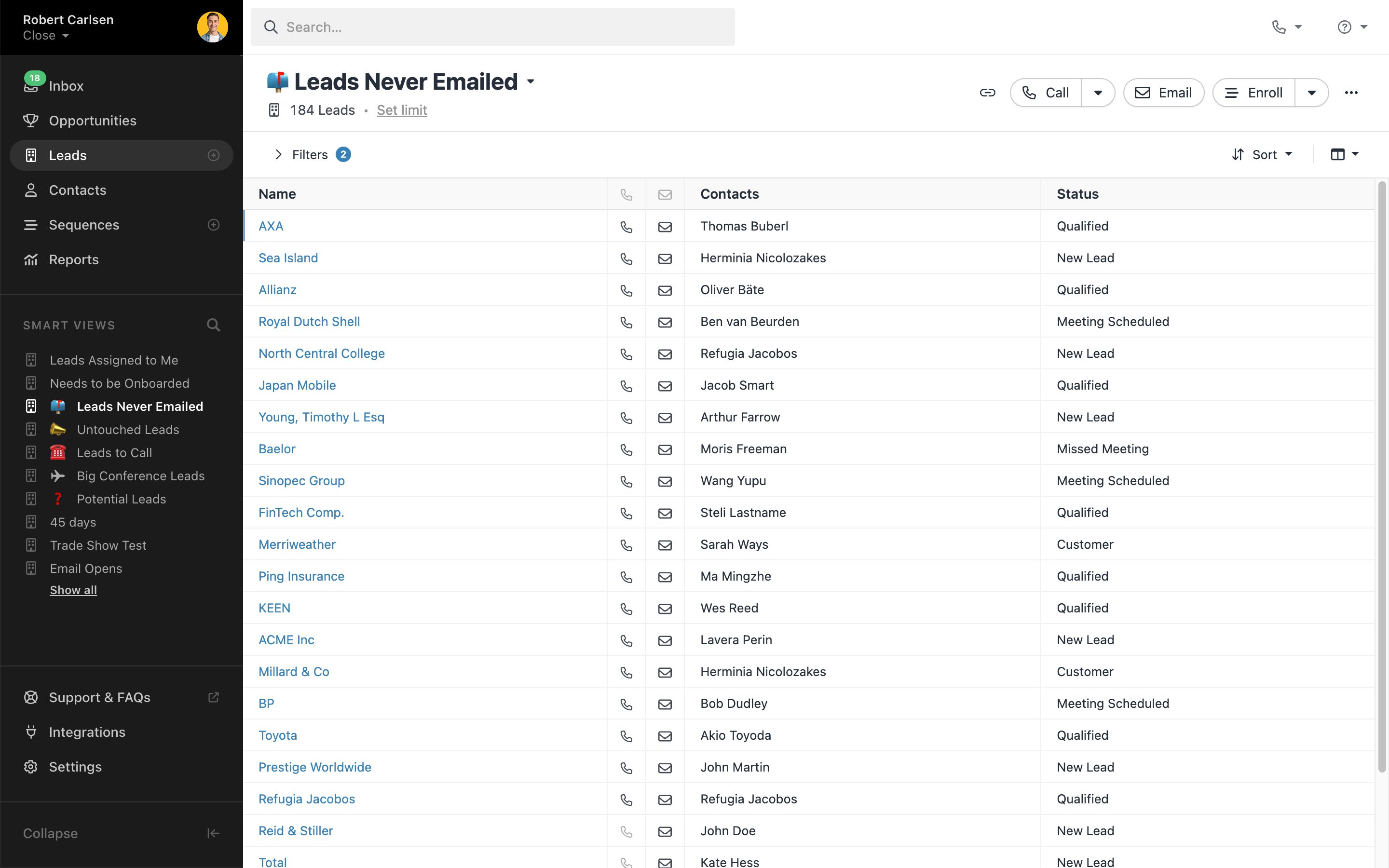
In this scenario, n8n can run a check: Does the lead already exist in your Close CRM? In fact, it runs this check first. That’s how conditional logic leads to cleaner data.
Within n8n, you’ve already created routing logic to assign the lead. This is up to you: territory, demographics, deal size, rep availability…whatever works for you.
(By the way, you can run “conditional logic” with lots of automation platforms. But because you’re running it all inside one workflow, you don’t have to split up this logic into multiple costly automations.)
Voilà: n8n tags the lead according to your logic, without additional cost. It pushes it into your Close Smart View so the right reps see it immediately.
What if the data fails, as we noted in the previous section? Create a workflow to route the lead back to a “fallback” queue rather than dismissing it outright.
Example #2: CRM hygiene and duplicate prevention
Scenario: You receive a new inbound lead. Only this time, the lead is a duplicate: someone who’s already visited your site.
How will your automation figure out that you’re receiving duplicate information? With n8n, the inbound lead should first trigger a lookup within Close. It might use identifiers like an email address or a familiar domain.
If a matching record exists, the workflow will use its logic to update the lead, rather than creating a duplicate.
Because you don’t care about per-action pricing, n8n can pounce all over this to clean up other CRM hygiene. It can append notes and activity logs, not replacing them. It can overwrite previously entered fields such as company size and industry.
Result: there’s no “slow creep” or duplicate records when you have duplicate inbound leads. The system simply updates them in a way that doesn’t wear on the accuracy of your sales reporting over time.
Example #3: Post-call automation and follow-ups
Scenario: You get off a call with a prospect, triggering a new webhook in your tool or CRM. And you really, really don’t want to do the busywork of updating your CRM manually.
If you like steady follow-ups, this is a perfect time for your automation to snap into action.
n8n might pull the call metadata as well as the meeting recording transcript. Using that data, it can also fill in CRM fields like outcomes, objections, next steps, and more. It might even prompt email drafts for follow-ups based on how the call went.
Again, it’s all within the same workflows, letting you pile on the automation actions without much care. You’re not worried about busting through to a new pricing tier.
All the while, n8n has pumped information into your CRM workflows. It flags objections for review, drafts the follow-up emails, and alerts the appropriate sales rep. And none of it has to be manual.
The Technical Reality: Security and Maintenance
So n8n gives you more control. You’ve probably gathered that much.
But there is a downside to control. You now have greater responsibility for managing your automations yourself.
You’re now onto the technical side of things. How do you achieve those workflows? Before you get yourself to the clean pipelines described in the scenarios above, you have some decisions to make:
- Where phrases like “fair-code” and “self-hosting” come in: n8n is happy to let you decide where to run things, after all. Fair-code means you’re free to use it if you pay for the servers yourself, also known as self-hosting.
- Where n8n runs: are you going to use your own server? A managed cloud? Building your internal infrastructure?
- How workflows authenticate: time to decide how n8N securely connects to your other tools via API keys. Who can access it, what is it allowed to do, and who manages permissions?
- What happens when a workload fails: do you want n8n to retry failures automatically, or alert your team? When is it time to flag a failure for manual review?
- How much data you keep: you’re going to have a lot of data streaming in. Where do you store it, and how long will you retain it?
- Who can access the automations: which teammates will view/edit/deploy your automations? Which credentials are they allowed to use?
- Single instance vs. queue mode: deciding whether one workflow runs jobs one at a time, which matters with how n8n’s pricing tiers work (you can only run so many at one time)
- Manual updates vs. scheduled upgrades: do you want to control when workflow and system updates happen? Let them happen automatically? On a set schedule? What?
More control means you’re also responsible for fixing things.
For example, imagine one of your workflow breaks at 2 a.m. on a Wednesday morning. If you’re using Zapier, you might see the task failure notification in the morning and hope it works when you retry.
In n8n? You decide how to handle these issues as a matter of policy. Does a workflow retry it automatically? Should it trigger an alert on a team member’s dashboard? And if so, who “owns” the failure?
(It’s probably best if they know this in advance.)
To be fair, you don’t have to answer every question on day one. But you do have to acknowledge the tradeoff. You’re building a whole automation system here. There will be some tweaking and gear-adjusting before everything runs smoothly for your sales team.
Integrating Close and n8n
Why consider n8n with CRM software like Close?
Close “plays well” with n8n because they work with the clean, predictable building blocks that make for efficient automation. For example:
- APIs/webhooks: Close surfaces the appropriate “hooks” to set off efficient workflows. Using n8n in this environment won’t feel like making a square peg fit into a round hole.
- Lookups: n8n can easily check Close to avoid creating duplicates.
- Routing and CRM visibility: n8n makes it easy to assign who sees what. Close’s tags and Smart Views make it easier for your sales team to surface that information directly.
- Data enrichment and hygiene: with cleaner data (enriched even before your reps see it), your sales reps spend less time in data maintenance mode.
Let’s translate that to business talk.
- Faster speed-to-lead: With routing and lead assignments happening automatically, reps work more efficiently. Your follow-ups get faster. People start suspecting you’re a robot. In a good way.
- Cleaner data attribution. With fewer duplicates to contend with, each rep has an easier time spotting single records for single leads within your CRM.
- Reps can trust your CRM. If the data’s already clean, reporting and analytics features become more accurate, and therefore useful, for sales coaching.
- It’s less annoying. That’s a business benefit, right? A system answering questions automatically (is this lead new, who owns this lead, etc.) means humans aren’t doing it all in Slack.
Start Small, Scale Smart
We know n8n sounds like…a lot.
But you don’t have to rebuild your entire sales tech stack today.
Start with one workflow. Try automating one thing that’s already annoying something on your team, like:
- Automating lead intake with routing, letting n8n check and enrich the data. It can then assign that data to the right person before the rep ever touches it.
- Preventing duplicate records by handling your inbound leads, checking for existing leads in your CRM, and updating them rather than creating new ones.
- Handling post-call updates by bringing in notes and next-steps within your CRM, reducing the need for a manual follow-up.
You don’t have to get to a state of “fully automated sales pipelines” later today. Instead, think of n8n as an investment in a lighter load. Making your automation a bit “smarter” means you’ll have fewer manual fixes, which means less babysitting from your sales team.
(According to a Salesforce report in Singapore, sales reps were only spending 29% of their week selling. With n8n, you can start fixing that problem.)
FAQs About n8n for Sales
Is n8n better than Zapier for sales teams?
n8n is often better if you have high data volume or anticipate higher volume soon. It’s cheaper to scale and better at handling more complex logic. But Zapier is generally easier for non-technical users to set up quickly and handle simple, smaller-team tasks.
Can I use n8n for free?
Yes, you can self-host it on your own servers, which makes it free. They have a fair-code license that makes it possible for you to use it for internal purposes only without paying more. If you want extra features, you may have to pay for the server infrastructure. The good news is that you avoid the per-task automation fees.
Does n8n require coding knowledge?
It’s a low-code platform, but you’ll need to know basic JavaScript if you want to handle data transformation and advanced logic. You don’t have to know advanced code to build basic workflows. If you want to use the full potential of n8n, we do recommend knowing a little about coding to handle these small snippets.
Is self-hosting n8n secure?
Self-hosting n8n is as secure as you make it. You’ll be responsible for issues like server hardening, SSL certificates, and managing access controls. A self-hosted server can become a security risk if you allow it to be. For further reading, we recommend you read up on CVSS 10.0 vulnerabilities.
Now That You Know WTF n8n Is…
n8n is a “grown-up” automation infrastructure: more advanced than Zapier, and potentially easier to scale.
If you like more control, it gives you plenty of advantages. With simpler pricing, you can use more automation actions with every lead, which helps you automate more of your CRM workflows as inbound leads flow into your business.
Additionally, its more advanced decision-making abilities give you more control, which helps your business avoid issues like lead duplicates and inaccurate reporting. Translation: you spend more time on sales, less time babysitting your automation suite.
Want to make the best possible use of n8n? Sign up for a free trial of Close and begin discovering what you can accomplish when your sales team lets software do more of the work.