
All the new tools that integrate AI for sales functions can feel like sorcery. But when you feed them unclear or misattributed sales data…you’ll quickly realize they’re not magic solutions.
The real magic wand? Data hygiene.
AI is only as good as the data you train it on. If your data isn’t clean (see also: current), AI won’t give you the transformative outputs you’re after.
High-quality data is “the foundation of trustworthy AI,” said Abhas Ricky, CSO of Cloudera. Why? Clean data means clean reports. Clean insights.
The question, then, is: How do you get your CRM shit together before you scale and automate with AI?
AI Can Only Scale the Quality of Your Data
We’ll start with the bad news. If your CRM is full of fragmented or outdated data, slapping a layer of AI on top of it is only going to scale these errors.
Maybe you’ve noticed your lack of shit-togetherness showing up in your CRM in the form of these symptoms:
- Duplicate leads, which turn into conflicting priorities when your AI doesn’t recognize duplicates. Even worse, not recognizing duplicate leads can throw off conversion percentages and give you inaccurate reporting in your CRM data analysis.
- Outdated leads, which create hallucinations in your workflows. You may think your pipeline is full when, in reality, you have a bunch of old leads who have already committed to a competitor.
- Inconsistent custom fields, like SMB vs. small business vs. <50 employees, confuse AI. And AI won’t tell you that. It will just try to make sense of everything you’ve done and give you inaccurate reports.
- Broken ownership rules, which make it hard to assign high-quality leads to the appropriate sales reps. AI can’t help you here, either. Not without guessing.
So what happens when these data hygiene problems pile up? They’re annoying, yes. But that’s not the full story. They also cost you money, time, and real insights. Even worse, your competitors (the ones with clean data) are starting to leap a few steps ahead of you.
91% of respondents said they can’t successfully adopt AI without a reliable data foundation. Yet only 55% were confident, saying they had that foundation in place, according to the Harvard Business Review,
“When CRM data is messy, missing, or duplicated, AI tools end up producing poor or misleading results, just faster and at a bigger scale. Before adding more AI to the tech stack, teams should first clean up the basics: agree on required fields, remove duplicates, keep records up to date, and set simple rules or automation so data stays clean over time.”
—Dorian Sabitov, Salesforce Consultant
The Three Data Issues That Kill AI Before It Starts
“The biggest mistake teams make,” says Kaylee Edmondson, Founder of B2B marketing consultancy Demand Loops, “is adding AI tools before fixing their data infrastructure.”
Edmondson says she’s seen companies spend more than $200,000 on AI tooling… despite their CRM having 47,000 duplicates.
The result: Lost resources and useless data.
So before you dump $200,000 on a system that’s loaded with issues like duplicates, let’s take her advice and fix three key data issues before you make that kind of investment.
Fix #1: Accounts with Multiple Duplicate Entries
“Different tools create records differently,” said Edmondson. Before you add a new tool, you need to know that the old tool’s output is going to make sense to your CRM.
The first step is a healthy migration process. If you were using Close, for example, we’d recommend a feature like Group Related Rows. This lets you pick a column in the entries as the key identifier for duplicates.
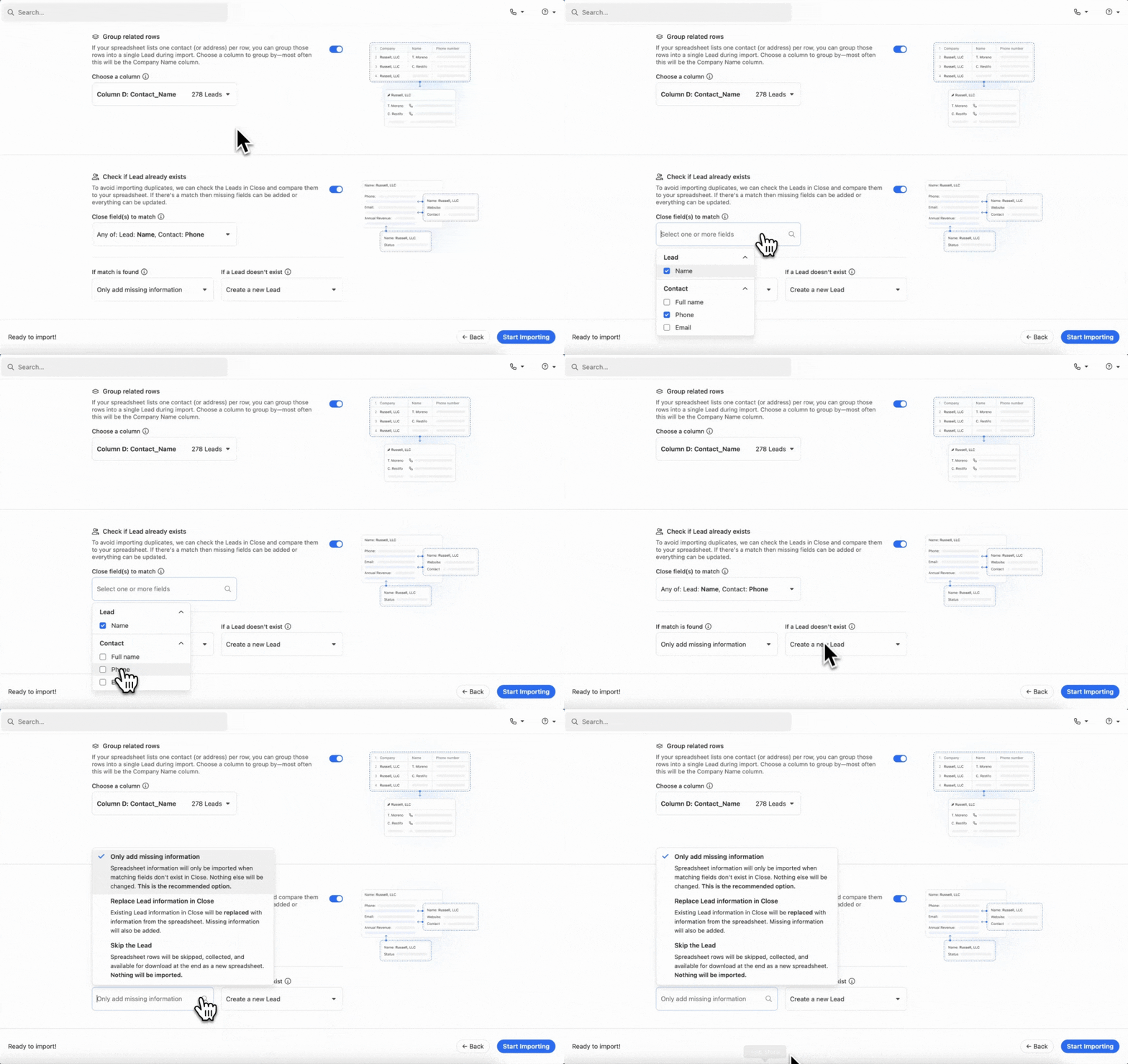
What defines a duplicate? Is it a person with the same name? The same email? Glance over your existing data and see if you notice any pattern in how duplicates arrived.
Fix #2: Intent Signals and Product Usage Scores Living in Disconnected Systems
This is a data fragmentation problem. In plain English, it means that your different tools (marketing automation, product analytics) all store customer data…
…they just do it in annoyingly different ways.
One tool might structure it by company size. Another by “employee count.” A third leaves it as a free text field.
Now multiply that across industries, lifecycle stages, and ownership rules. Suddenly, you have no idea which leads are which, and you’re not going to identify high-intent signals.
To fix this, check out AI Enrich. In Close, this feature can update a single field across your highest-priority records. For example, you might update specific fields, such as company size, natively within your CRM.
(We’ve offered some more tips on using AI Enrich to pump up the quality of your CRM data. For example, you can use AI to build your own fields. Highly specific custom fields are great because they let you add nuance without inaccurate data in the other fields.)
It’s a quick way to prune, but it yields cleaner, more actionable data.
Fix #3: Missing Data Flow (You Want Data Flowing Both Out and In)
Call it bi-directional data flow. Your sales engagement tool might automatically send out a follow-up email. Very cool. Very AI.
But if the system has no idea it needs to update the customer's status in your CRM, the data flows only one way. Towards the customer.
There are a few ways to fix this:
- Run outreach directly inside your CRM whenever possible. (Disparate tools tend to lead to missing data flow.)
- Use native integrations as much as possible. (Ditto here.)
- Set a new rule for what to update in your CRM. (What happens to a deal stage, for example, after an email reply?
How One Actually Gets Their CRM Shit Together
Okay, so you have lots of little tips for better data hygiene. But let’s say you’re looking at a whole mess, like a hoarder’s house full of bad CRM data. Where do you even begin?
Your first step is to change your mindset. Think of data hygiene as reliability at its core. Data doesn’t have to be 100% full. You just need CRM data useful enough to drive meaningful action.
From a big-picture, clean-out-this-hoarder-house perspective, here are some principles that will help:
- Unify your fields. No more “small business” category if you already have “<50 employees” as a category. This prevents duplication and streamlines the data flow for assigning accurate ownership roles.
- Make sure lead status reflects reality. Do you have a review process in place for existing leads? If not, now’s the time to implement one.
- Assign clear ownership to specific data hygiene responsibilities. Division of labor in practice. “You get the kitchen, I’ll take the garbage out.”
Let’s take an example.
Imagine your top priority is improving the hygiene of your lead intake data before implementing AI. This is useful because it’s like starting at the front door to your CRM.
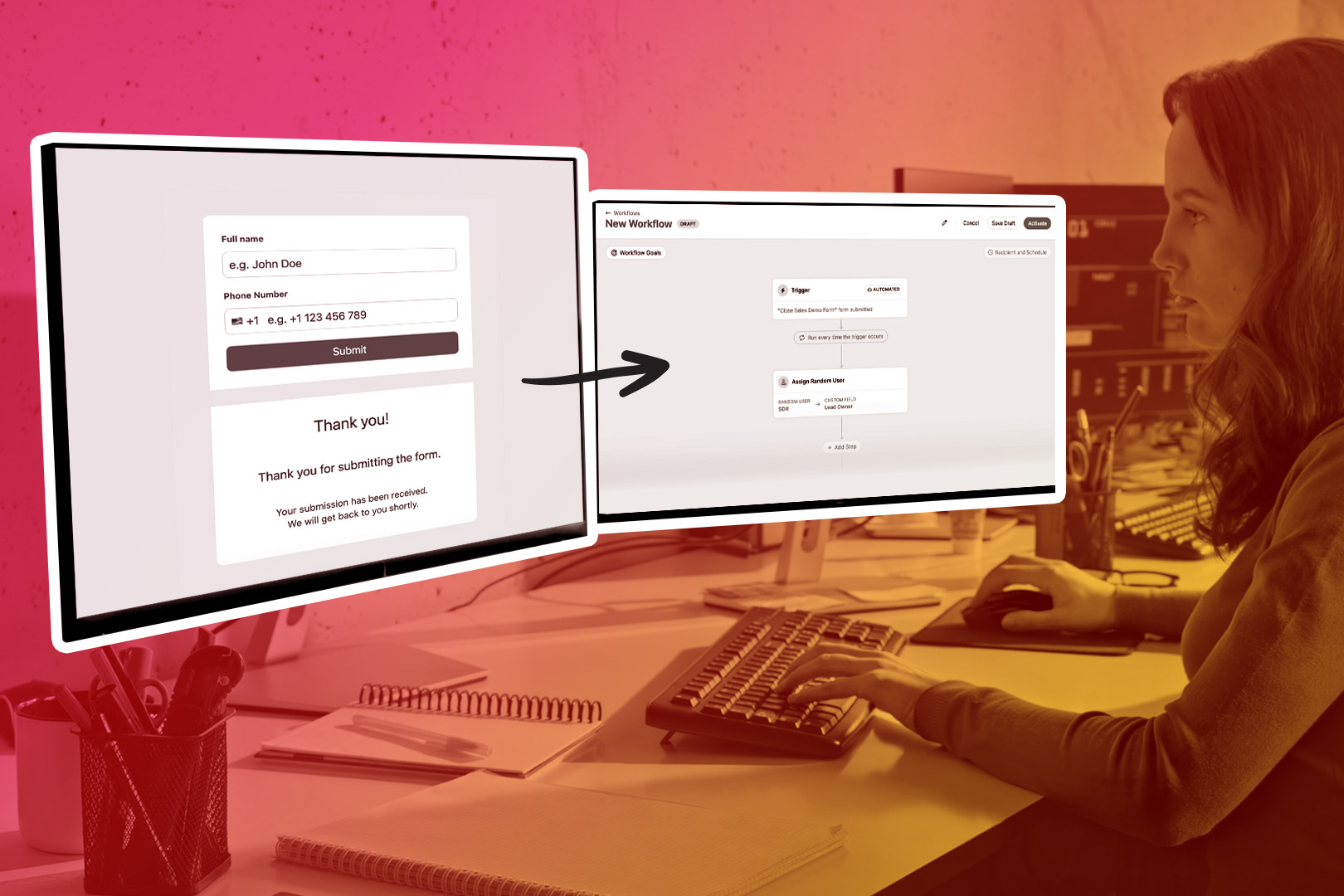
In this scenario, you might have an inbound lead from a form. As we noted in Fix #3 above, one of the best ways to clean up your data issues is to use consistent tooling. So here, if you were using Close, you’d also want to use Close forms to start filling the rest of the data pipeline.
This ensures consistency and accuracy in your data. With that form in place, every new lead now follows the same data rules.
Keep working through examples like the above. Map out your pipeline, start early, and work through it until the data starts looking clean.
Start with the Data Your Team Touches Every Day
How do you clean your data? One bit at a time.
We know that a whole pile of unhygienic data is intimidating, so don’t aim to get it all right in one go. Aim for consistency, not perfection.
One way to do that is to take the example above and fix your inbound lead forms until they’re CRM-native. But maybe that’s not your specific issue. You can diagnose your specific data hygiene problems by asking: What does my team touch every day?
Are they interacting with data in the form of…
- …leads?
- …opportunities?
- …activities like calls, notes, and follow-up emails?
If so, ask them: which spot has the most “data gunk” right now? Where is poor data hygiene most interrupting their sales flow?
If you decide, for example, that you have inaccurate lead and opportunity statuses in your CRM, that’s your priority. Look through the data and ask why you’re getting duplicates or outdated leads.
Pay special attention to form fields and categories. It’s usually bad rules that make the data go haywire. Update the form fields and categories to eliminate duplicates. Or migrate all your data to one solution so you can get a fresh spreadsheet view of everything.
And don’t forget about asking who owns which data. If you put someone in charge of data, it’s a bit like putting someone in charge of a room in a house. No one wants to “own” a dirty room. Ask each role in your sales team about the most important element in their personal sales data. Now you have a list of the highest-priority specifics.
Using a Clean System to Start Fresh
One final tip? When in doubt, press the reset button.
In the context of CRM data hygiene, that means migrating B2B sales data to a new CRM. Even the mere act of preparing data for import/export has a clarifying effect. You start asking questions:
- How would you organize your current data for migration?
- What are the key “must-have” fields you’d use to categorize leads?
- If you had to “teach” AI how to read your data, what would you tell it?
Maybe those questions aren’t as fun as a session of “What’s my line,” but they’ll be incredibly useful. Act as though you’re really implementing a new CRM. Heck, you can even try migrating to a new CRM to see what issues pop up, if any. We’ve noticed a few benefits to customers migrating to Close:
- Better customer data, since everyone is working from the same customer information.
- Clearer pipeline visibility, which means you always know where deals stand.
- Stronger sales metrics, potentially lowering your Customer Acquisition Costs.
- More accurate forecasting, giving you the ability to plan because your data now represents an accurate snapshot of your sales.
Data migration alone has a clarifying effect on your data. But when the CRM you’re migrating to has better ways of managing that data, the result can be downright transformative.
Getting Your Data Hygiene Shit Together
Maybe you don’t have your shit together. But data can be surprisingly easy to clean when you approach it the right way. The key is knowing that the process is worth it. Garbage in, garbage out. Clean in, clean out.
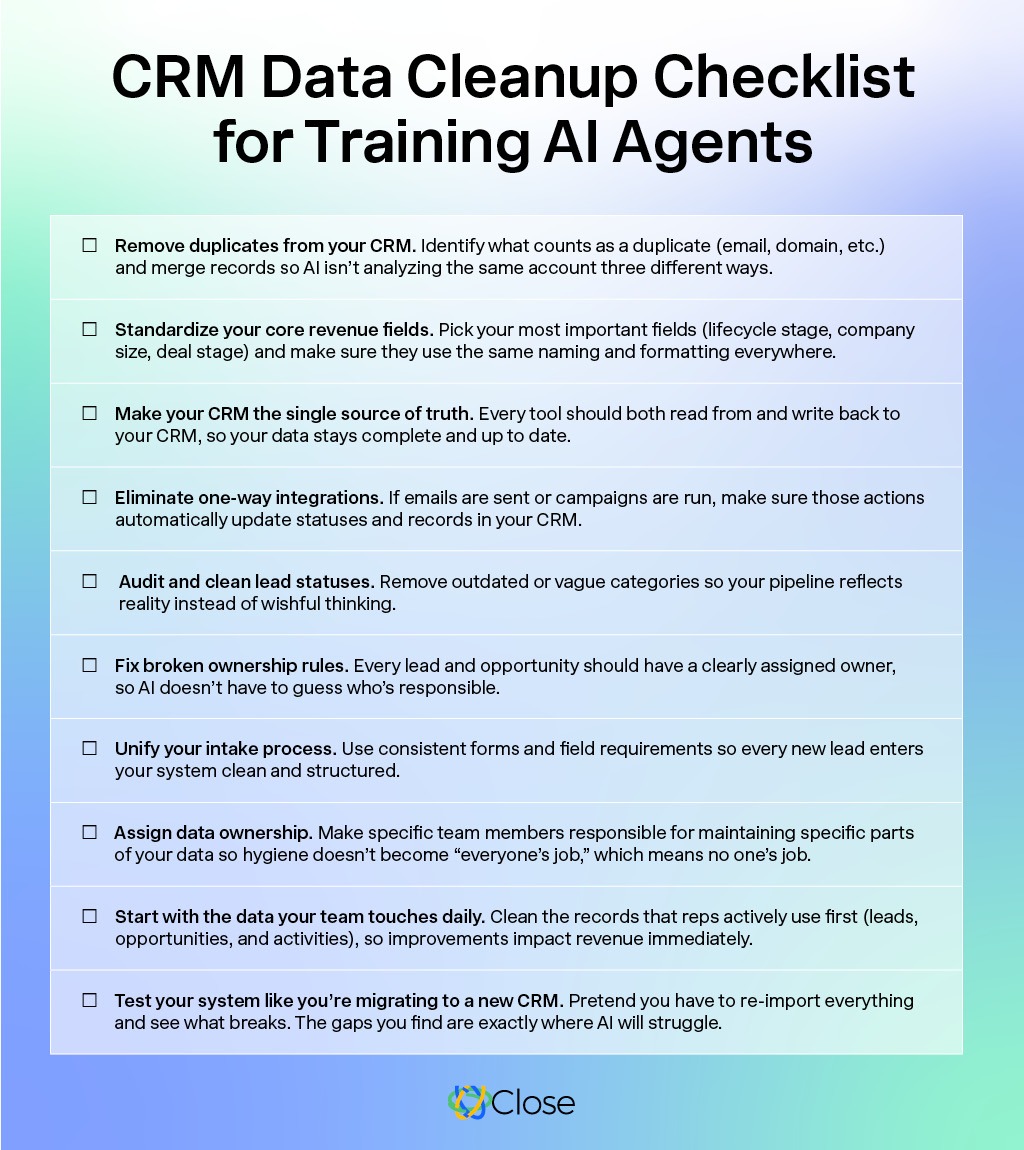
AI isn’t going to do much for you if you don’t know what to tell it. Clean data is your version of making the AI happy so it can file better reports, write more persuasive follow-up emails, and forecast your data more accurately.
But it doesn’t happen overnight. You’ll need a system of good data habits and foundational decisions that can make the tips above far more intuitive. Ideally, you’ll start practicing better data habits as a result.
Want to start migrating to a new CRM to see how quickly you can clean your data within one tool? Try a free trial of Close today.